The slide rule side
Two logarithmic scales, one on the body and one on a disc that turns, with windows for true airspeed and altitude. It multiplies, divides and converts, so it handles time, speed, distance, fuel, units and temperature.

 Free online flight computer
The EPPL-1 is Easy PPL's own whiz wheel, and you can use it here for free. Work out time, speed, distance, fuel and conversions on the slide rule side, and heading and groundspeed on the wind side, as you would on a CRP-1 or an E6B.
New to the whiz wheel? Our The Whiz-Wheel Flight Computer Course teaches it from the very start.
Free to use
This is the full EPPL-1, both sides of it, working exactly as a mechanical flight computer does. Turn the disc, move the cursor and the slide, and pencil your marks on the wind side. It doesn't work out the answers for you. You set the scales and read them, just as you will in the exam and in the aeroplane.
The basics
A whiz wheel is the pilot's name for a mechanical flight computer. It looks like a dial in a frame, and it does the arithmetic of flying: how long a leg will take, how much fuel you'll burn, how a speed in the air becomes a speed over the ground. Pilots have used them for decades because they need no batteries and they show you the whole problem, not just a number.
In UK flight training the standard is the CRP-1. In America the same kind of computer is the E6B. The EPPL-1 is Easy PPL's own, laid out like the CRP-1, so everything you practise here works on the computer you'll take into the navigation exam.
Two logarithmic scales, one on the body and one on a disc that turns, with windows for true airspeed and altitude. It multiplies, divides and converts, so it handles time, speed, distance, fuel, units and temperature.
A ring marked in degrees round a clear disc, over a slide printed with speed arcs and drift lines. You pencil the wind on the disc and it shows you the wind triangle: the heading to fly and your groundspeed.
Side one
Here the EPPL-1 works through seven sums from our The Whiz-Wheel Flight Computer Course. Watch them, or choose one. The yellow marks are what you set and the blue ones are the answer.
01
The slide rule side has two logarithmic scales: the outer scale, printed on the body, and the inner scale, on the disc that turns. Turning the disc multiplies and divides. Whatever two numbers sit against each other, every other pair round the scales is in the same ratio.
The numbers repeat. The 9 on the scale can be 0.9, 9, 90 or 900, so the computer gives you the digits and you put the decimal point in yourself, from a rough idea of the answer. 225 nautical miles is found at 22.5, and a reading of 15 minutes might be 150.
02
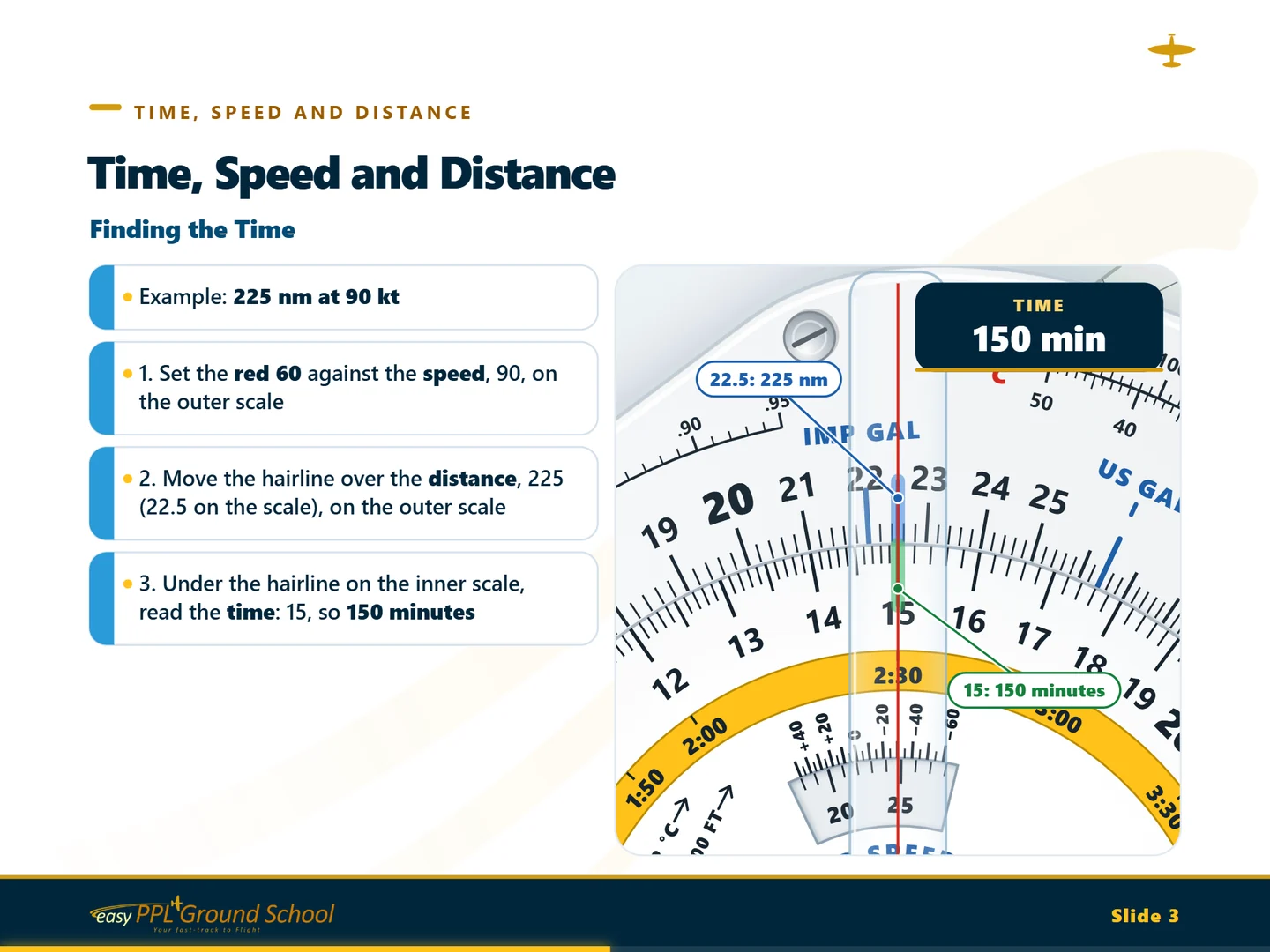
The red 60 on the inner scale stands for one hour. Turn the disc until the red 60 is against your groundspeed on the outer scale, and the computer is set for that speed. Every distance on the outer scale now has its time in minutes beside it on the inner scale.
At 90 knots, 225 nautical miles sits against 150 minutes, which is 2 hours 30 minutes. The hours ring on the disc shows it as 2:30, so you don't have to divide by 60 yourself. Turn it round and you have the speed you need for a distance and time, or the distance you'll cover in a given time.
03
Fuel works exactly like speed. Put the red 60 against the fuel flow, litres or gallons an hour, and read the fuel used against any time. 32 litres an hour for 45 minutes is 24 litres.
Read it the other way and the computer gives you endurance: find the fuel you have on the outer scale and the time it will last is beside it on the inner scale.
04
Each unit has its own mark on the outer scale: NAUT M, STAT M and km for distance, FEET and m for heights, IMP GAL, US GAL and Ltr for volume, and kg and lb for weight. Put the number you have on the inner scale against the mark for its unit, and read the answer on the inner scale against the mark for the unit you want.
50 nautical miles against NAUT M reads 92.6 against km. 5,000 feet against FEET reads 1,524 metres. 20 Imperial gallons is 90.9 litres. The kg and lb arcs turn litres of fuel into weight for its specific gravity, and the scale along the foot turns Celsius into Fahrenheit: 15 °C is 59 °F.
05
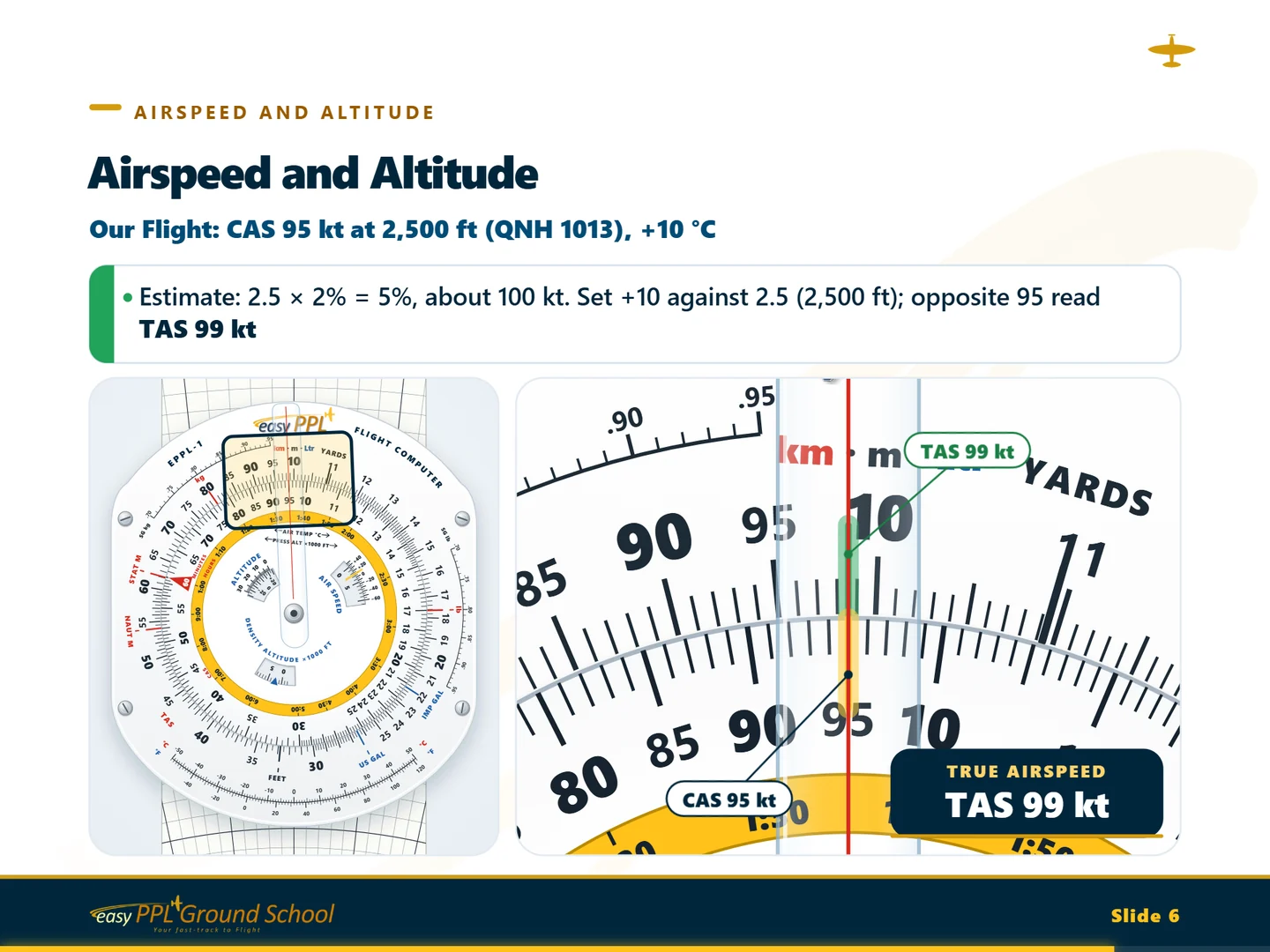
The higher and warmer you fly, the thinner the air, and the faster the aeroplane really moves through it than the airspeed indicator shows. In the AIR SPEED window, set the air temperature against your pressure altitude, then read the true airspeed on the outer scale against the calibrated airspeed on the inner scale.
100 knots at 10,000 feet with the air at −5 °C is a true airspeed of about 116 knots. Your true airspeed is the one you use on the wind side.
06
On a hot day the aeroplane performs as if the aerodrome were higher than it is. The DENSITY ALTITUDE window gives that height from the pressure altitude and the temperature: at 1,000 feet on a 30 °C day it's about 2,900 feet, which is the figure your take-off and climb performance depends on.
The ALTITUDE window corrects the altitude your altimeter shows for an air temperature colder or warmer than the standard atmosphere, which matters most over high ground in cold weather.
Side two
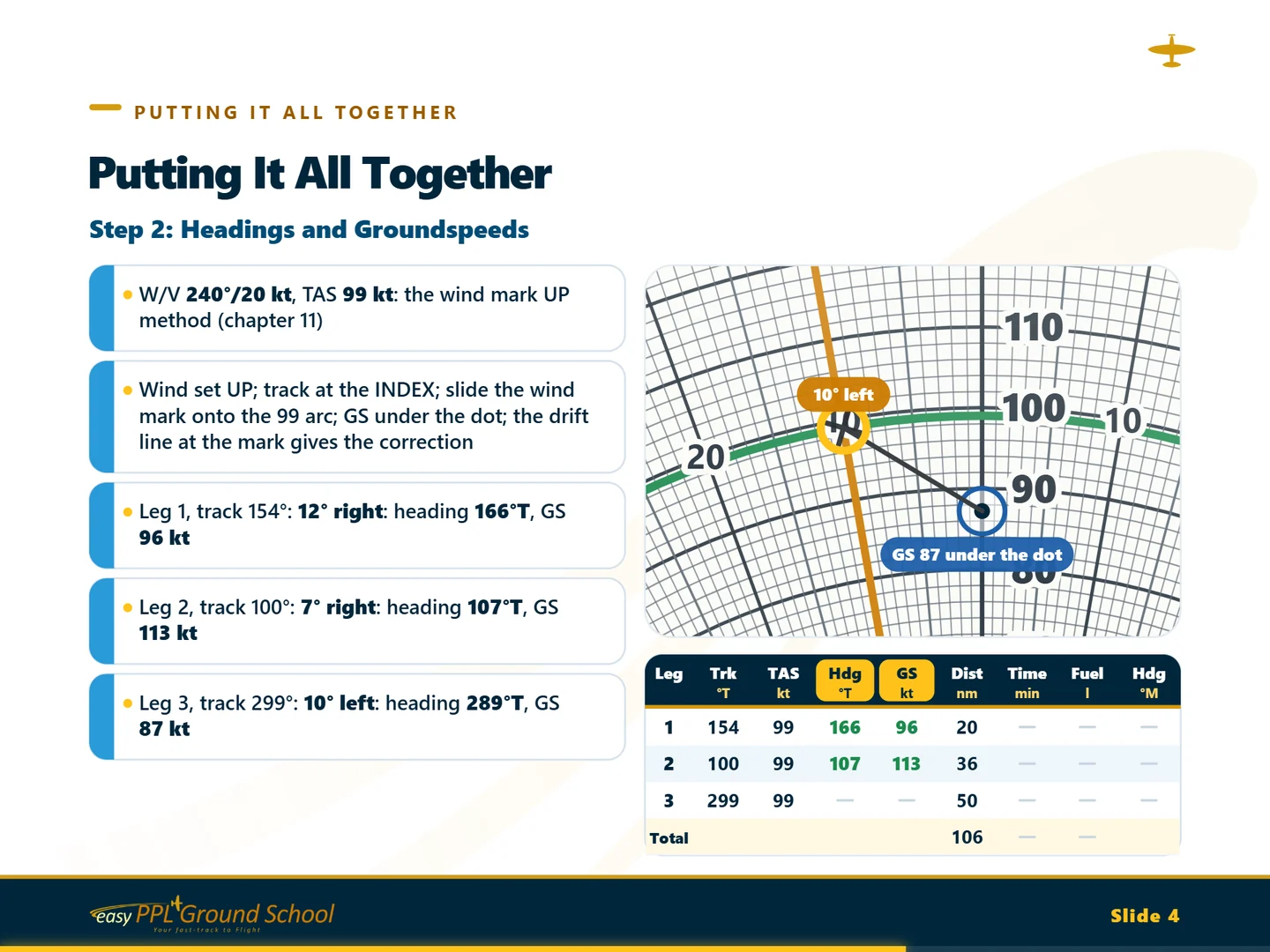
The wind pushes the aeroplane sideways and speeds it up or slows it down over the ground. To fly the track you've drawn on the chart you head a little into the wind, and your groundspeed is not your airspeed. That's the wind triangle. The wind side solves it with a pencil mark. Here it is by the wind down method, the one Easy PPL teaches, with a worked example: track 095°T, true airspeed 110 knots and a wind of 060/30.
The triangle it solves
The same side works the other way in flight. Once you know your heading, true airspeed, track and groundspeed, the computer gives you the wind you're actually flying in, which is often not the wind that was forecast.
Everything it does
How long a leg will take, or the speed you need to arrive on time. 225 nautical miles at 90 knots takes 2 hours 30 minutes.
Fuel used for any time at any fuel flow. 32 litres an hour for 45 minutes is 24 litres.
Nautical miles, statute miles and kilometres, each with its own mark on the outer scale. 50 nautical miles is 92.6 km.
Litres, Imperial gallons and US gallons, and fuel weight in kilograms or pounds from its specific gravity.
Feet and metres, and degrees Celsius and Fahrenheit on the scale along the foot. 5,000 feet is 1,524 metres.
Your true airspeed from the airspeed you fly, your pressure altitude and the air temperature, in the AIR SPEED window.
The altitude the aeroplane feels on a hot day, and your altitude corrected for temperature, in their own windows.
The wind triangle on the wind side: the heading to fly and your groundspeed, from your track, true airspeed and the wind.
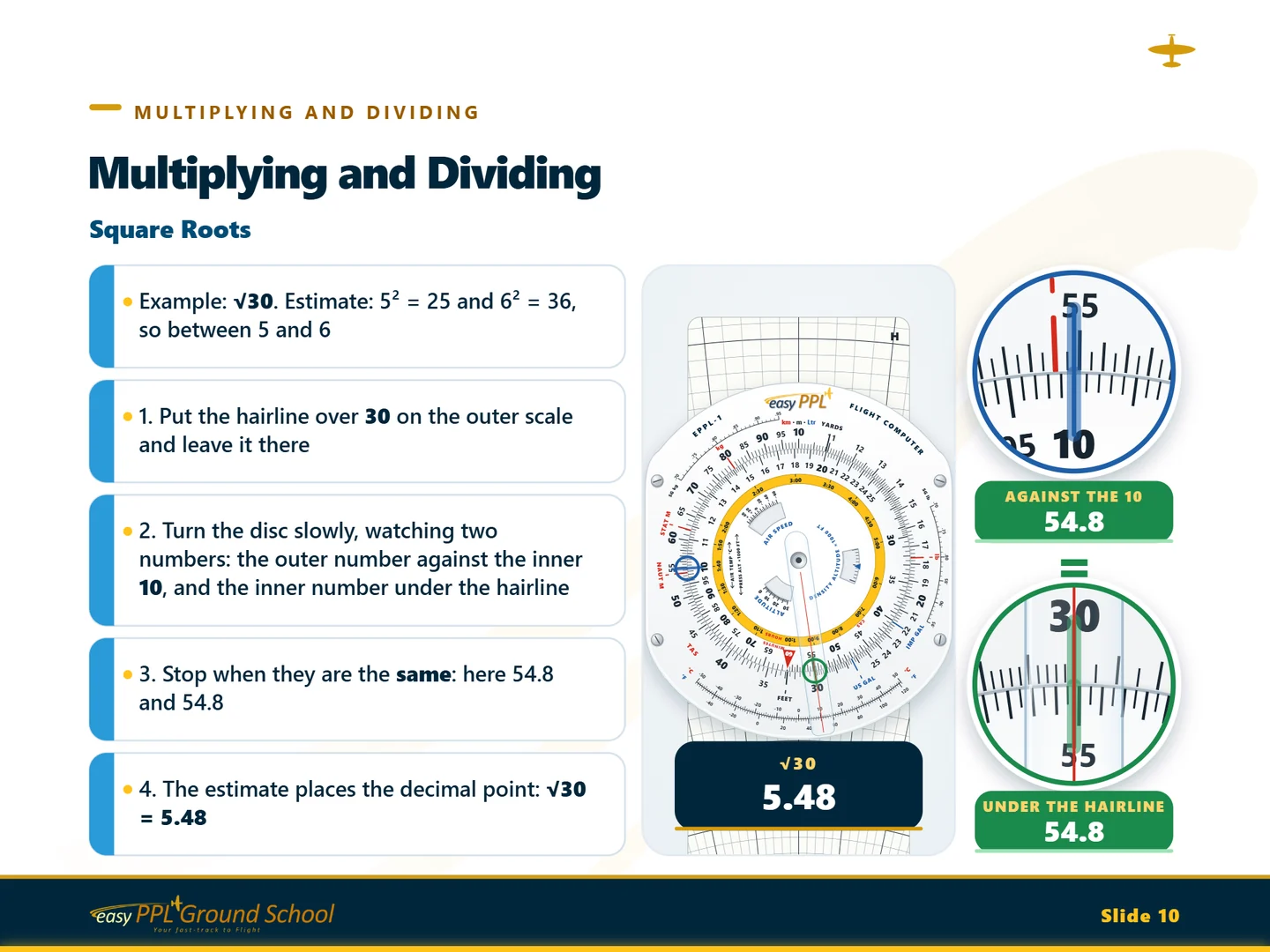
Multiplying, dividing, ratios and square roots on the slide rule side, and the 1 in 60 rule for corrections in flight.
In flight
A 1° error over 60 nautical miles puts you about 1 nautical mile off track. That's the 1 in 60 rule, and with it you can turn any distance off track into an angle.
Say you're 2 nautical miles left of track after 20 nautical miles. 2 in 20 is the same as 6 in 60, so the track error is 6°. Turning 6° right takes you parallel to your planned track. To reach your destination 40 nautical miles further on, add the closing angle: 2 in 40 is 3 in 60, so 3° more, 9° right in all.
The distance off track is drawn larger, so the angles show.
Words explained
Check your answers
The scales repeat every power of ten, so 15 can be 1.5 or 150. Always have a rough answer in your head first.
A wind of 060/30 blows FROM 060°. Put 060 at the INDEX, not the direction it blows to, and pencil the 30 knots straight down from the centre dot.
The wind side needs your true airspeed. Work it out in the AIR SPEED window first, especially when flying high.
Work the triangle in °T with a forecast wind, then apply the variation to get the magnetic heading you fly.
A wind mark right of the centre line is a drift to the right, so the heading goes to the left of the track, into wind. Then check the drift again before you read the answer.
They're different sizes, with their own marks on the outer scale. A US gallon is about 3.8 litres, an Imperial gallon 4.5.
Side by side
All three are flight computers and they do the same jobs. If you train in the UK you'll use a CRP-1 type, and the EPPL-1 is laid out the same way.
| Feature | EPPL-1 | CRP-1 | E6B |
|---|---|---|---|
| What it is | Easy PPL's own flight computer, on screen | The mechanical flight computer UK student pilots learn on | The American flight computer |
| Slide rule side | Yes, with the AIR SPEED, ALTITUDE and DENSITY ALTITUDE windows | Yes | Yes |
| Wind side | Turning ring and clear disc over a slide of speed arcs and drift lines | The same layout | A similar idea, laid out differently |
| Cost | Free, on this page | Bought from a pilot shop | Bought from a pilot shop |
| Where you use it | Any computer, tablet or phone, and beside every Easy PPL lesson | Planning, in the aircraft and in the exam | Planning, in the aircraft and in the exam |
Learn it properly
The Whiz-Wheel Flight Computer Course teaches both sides of the EPPL-1 from the beginning: reading the scales, multiplying and dividing, time, speed, distance and fuel, conversions, true airspeed, the wind side and a complete flight plan. Every lesson is animated, with progress tests and a course exam.
Questions
A whiz wheel is the pilot's name for a mechanical flight computer. One side is a circular slide rule for time, speed, distance, fuel and unit conversions. The other side, the wind side, solves the wind triangle, giving you the heading to fly and your groundspeed.
Yes. Use it on this page as often as you like, on a computer, tablet or phone. There's nothing to download and you don't need an account.
It's laid out like the CRP-1 that UK student pilots use, with the same kind of scales, windows and wind side, so a method you learn on one works on the other. The EPPL-1 is Easy PPL's own design.
They do the same jobs. The E6B is the flight computer American pilots use and the CRP-1 is the one used in UK flight training. Their scales and wind sides are laid out a little differently, so it's easiest to learn on the type you'll fly with.
Yes. The flight computer is the one tool every student pilot has to master, for the navigation exam and for planning real flights.
No. Like a real whiz wheel, you set the scales and read the answer yourself. That's what makes it good practice: what you learn on the EPPL-1 works on the flight computer you take into the exam.
With the grid's zero under the centre dot, put the wind direction at the INDEX and pencil the wind speed straight down from the dot. Slide your true airspeed under the dot and turn the track to the INDEX, then read the drift where the wind mark sits. Turn the disc by that drift into wind, so the track sits against the drift mark beside the INDEX, and check the drift again, adjusting until the drift and the offset agree. Read the heading at the INDEX and the groundspeed on the speed line through the wind mark.
On the slide rule side, turn the disc until the red 60 on the inner scale is against your groundspeed on the outer scale. Find the distance on the outer scale. The time in minutes is beside it on the inner scale.
Yes. Drag the disc, the ring and the slide with a finger, pinch to zoom in on the scales, and use the full screen button for the biggest view.
Our The Whiz-Wheel Flight Computer Course teaches both sides of the EPPL-1 step by step, from multiplying and dividing to the wind triangle and a complete flight plan, with progress tests and a course exam.
See the courseBookmark this page and the EPPL-1 is here on any computer, tablet or phone. Easy PPL students also have it beside every lesson.